The docket is the working list
Defendant, violation, status, and balance stay visible so clerks are not reconstructing the matter from separate files.

Court Management
Cases, appearances, decisions, payments, accounting, and reporting stay tied to the matter.
The clerk works the case from intake through close-out.
Thin Line Court Management is municipal and justice-court software for citation-based cases.
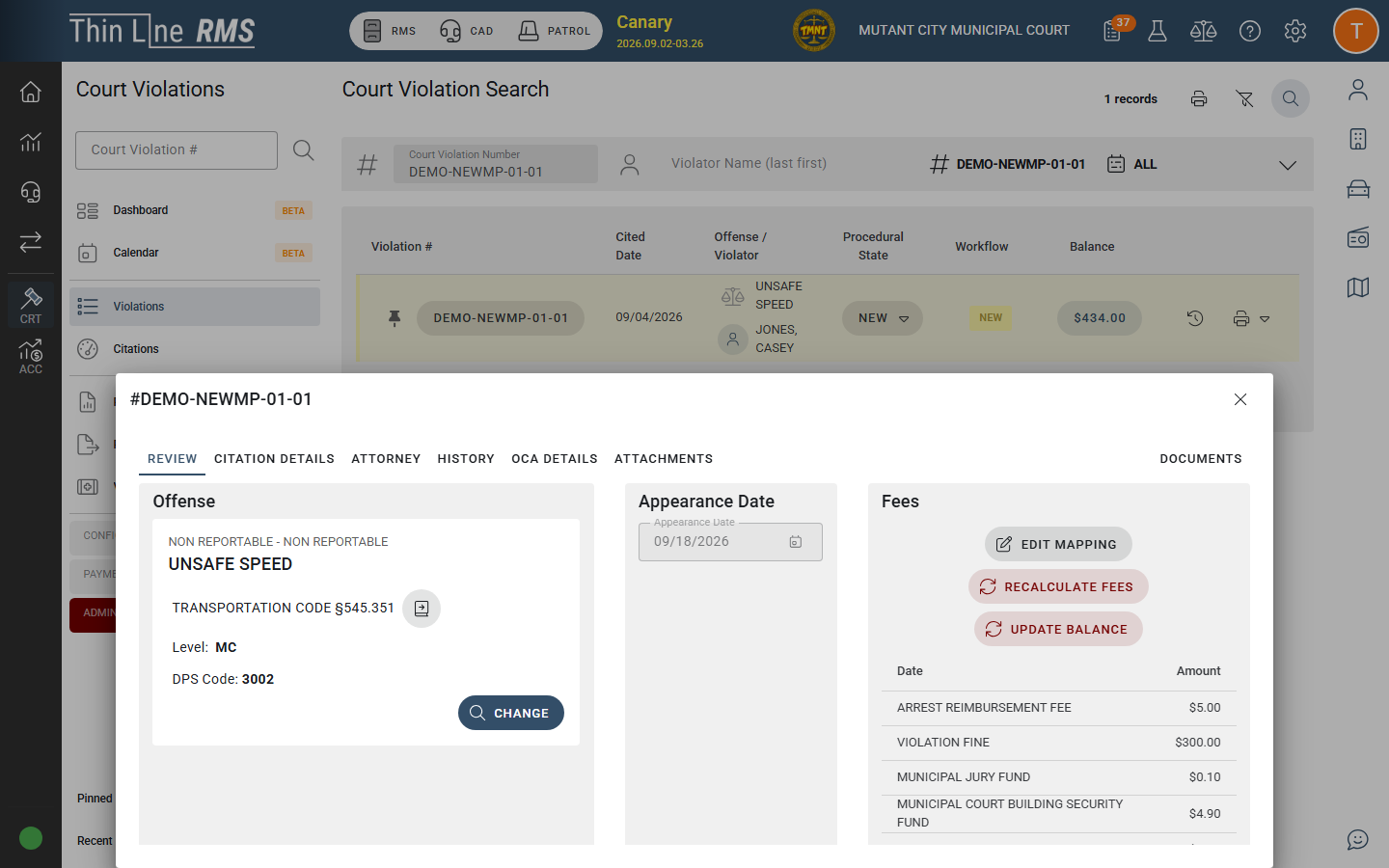
Explore the screenSelect a number to see how the work moves.
Defendant, violation, status, and balance stay visible so clerks are not reconstructing the matter from separate files.
Appearances, pleas, programs, payments, and warrants remain on the case.
Receipts, plans, allocations, and balances remain traceable to the originating case.
OCA, DPS conviction, and related Texas reporting come from the cases the court is already working.
What's in it
Defendants, violations, citations, queues, calendars, and appearances.
Pleas, deferred disposition, driving safety, compliance dismissals, orders, and disposition.
Fines, costs, receipts, plans, balances, and refunds on the case.
FTA, court-owned warrants, bonds, and post-judgment activity.
Deposits, allocation, reconciliation, close-out, and Texas reporting from the same case.
The working case
The citation becomes a case. A decision becomes part of the history. The case closes through disposition, accounting, and reporting.
Defendants, violations, status, queues, and balances sit on one case list so clerks can work the next matter without rebuilding context. Opening a case shows the citation, history, documents, and court detail already attached.
Calendars, queues, and appearance activity remain part of the case history. Clerks and judges work the docket from the record instead of a separate calendar that has to be kept in sync.
Plea entry, deferred disposition, driving safety, and other court programs remain on the case so later payments, deadlines, and disposition start from what the court already decided.
Eligibility, documentation, fees, approvals, orders, and disposition stay attached to the case instead of being managed as an informal side process. Clerks can move a compliance path without leaving the matter they are working.
Judgments, orders, and final outcomes are entered on the case. Fine, cost, and post-judgment activity continue from that decision instead of a disconnected outcome file.
Cashiers take payment against the matter in front of them. Allocations, balances, and receipts remain part of the case financial history instead of a register that has to be matched later.
Installment terms, due amounts, and remaining balance stay attached to the matter so cashiers and clerks can see what is owed without opening a separate finance tool.
FTA, court-owned warrants, and bonds remain on the case. When RMS is connected, authorized law-enforcement users can see a warrant while ownership and status still belong to the court that issued it.
Deposits, revenue allocation, reconciliation, and close-out continue from payments already taken on the docket. Finance works the books without breaking the link to the originating matter.
When an account is referred, the balance and collection activity remain connected to the matter. Collections is a continuation of the case, not a second set of books.
OCA, DPS conviction reporting, and related court packs are produced from the same case data clerks and judges already used. Reporting is an output of the docket, not a parallel system.
Same case
The clerk doesn't need the cashier's drawer, and the cashier doesn't need the clerk's queue. Each role sees the same case from the work they do.
See what they need to work the docket.
See the balance on the case in front of them.
See what happened before they decide.
See the court’s work from the same cases.
See deposits and close-out still tied to the matter.
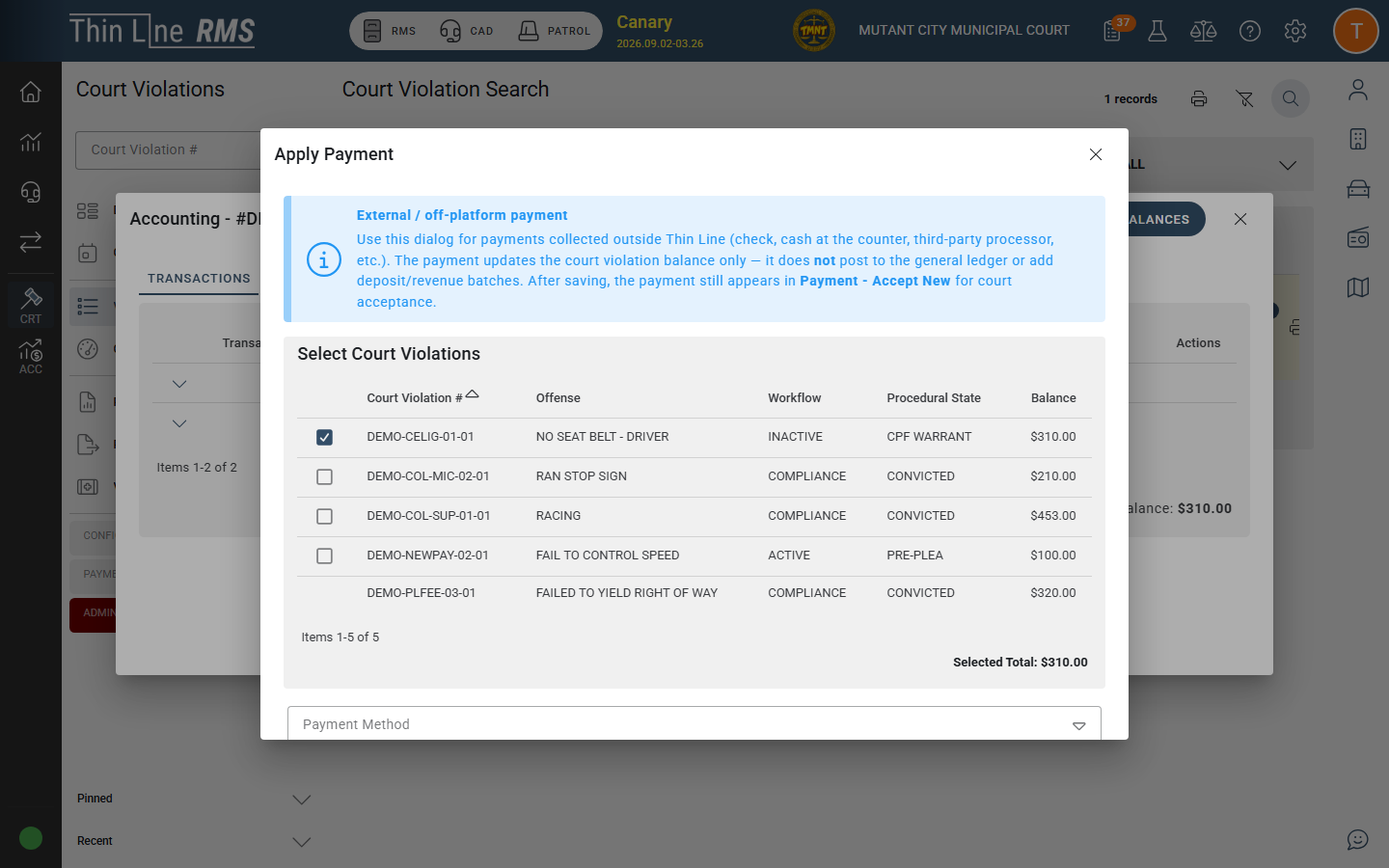
Explore the screenSelect a number to see how the work moves.
Where the work continues
Court Management doesn't depend on another Thin Line product to run the docket. But when a court also uses RMS or Mobile Citations, the case doesn't have to start from a rebuilt ticket.
RMS
Citations can become court cases, and court-owned warrants remain available to authorized officers when RMS is connected.
Mobile Citations
A citation written in the field can become the start of the court case when both products are in use.
Law Enforcement
The court keeps ownership of the case and of warrants it issues. Officers work from that warrant where policy allows.
Bring your records
Moving to Thin Line shouldn't mean starting over. We work with your existing cases, map the data into Thin Line, and validate the conversion with your court before go-live.
From the field
Resources
Evaluating the details?